Russ was interviewed on OKRs as part of the GTMHub Podcast series on OKRs and performance measurement in business. In this interview, Russ covers a lot of ground like the ways OKRs can help small businesses, a walk through of how to cascade OKRs, how to approach tracking metrics when you’re first starting out and the dangers of being efficient in the wrong places at the wrong times.
0:00 Intro
2:00 Russell Cummings’ background
5:02 Challenges small and big companies
7:30 2 ways to use OKRs in a small businesses
16:20 Best business practices
20:40 Stop and prop
21:24 Forcefield analysis
23:23 Engaging employees
27:38 Growing 2-20 million dollar companies
32:50 Stories of success
44:46 Rapid fire questions
50:30 Outro
In the dynamic world of business, effective decision-making is the linchpin for success. Yet, many managers grapple with the challenge of lacking a clear process. Fear not, for I bring you a practical model designed to simplify decision-making for small business owners and managers.
Let’s delve into this uncomplicated, yet potent, approach that promises to enhance the decision-making prowess of your small business team.
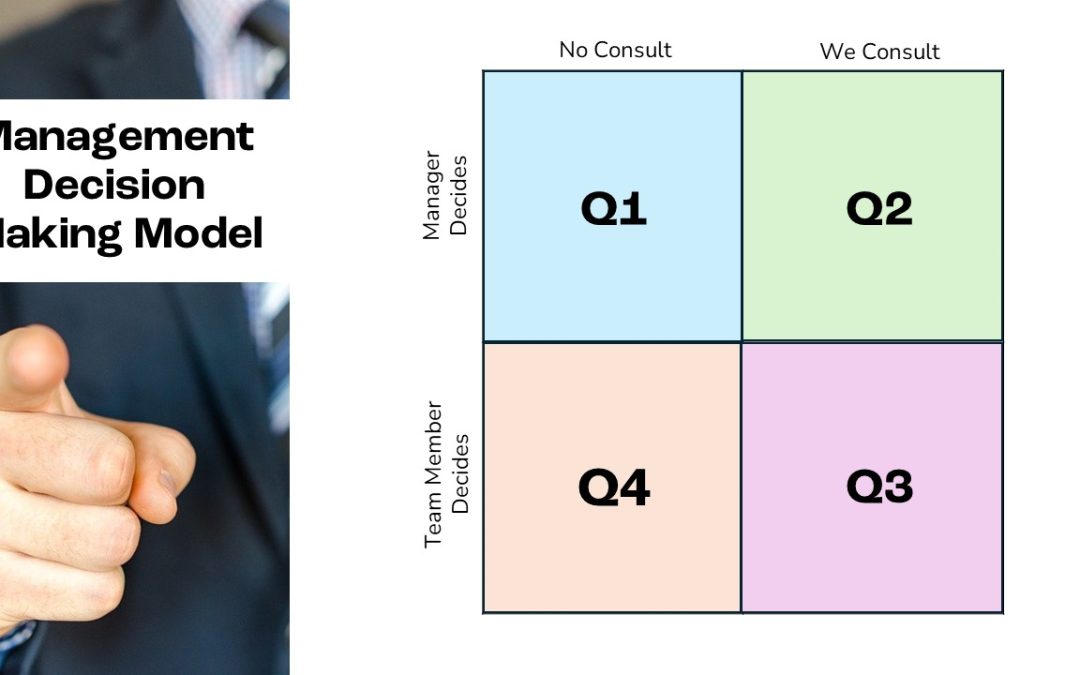
The Decision-Making Model
At the heart of this model lies simplicity, breaking down decision-making into four distinct quadrants.
In Quadrant 1 (Q1), the boss takes the reins independently.
Quadrant 2 (Q2) involves a discussion, but the final call rests with the boss.
Quadrant 3 (Q3) encourages team discussions, but the team member makes the ultimate decision.
Lastly, Quadrant 4 (Q4) requires minimal discussion; the team member autonomously decides.
This straightforward framework provides a roadmap for navigating the intricacies of decision-making within your small business team.
Quick Tips for Implementation
To seamlessly integrate this model into your business, set clear expectations for each quadrant. Discuss potential scenarios pertinent to your business, fostering conversations around roles and responsibilities.
For example, certain decisions may fall within the team member’s domain (Q3), while others necessitate the boss’s input (Q2). Making the model a regular reference point during discussions ensures a shared understanding among your team, promoting consistency and efficiency in the decision-making process.
Implementing with Your Team
When introducing this model to your small business team, simplicity is key.
Explain it in clear, straightforward terms, and prominently display it in your workspace as a visual guide.
Encourage your team to refer to it during discussions, creating a shared language and approach to decision-making.
By making the model an integral part of your team’s dynamics, you promote transparency and efficiency, paving the way for smoother decision-making.
Conclusion
In essence, this accessible decision-making model is tailored to empower small business teams. By incorporating it into your operations, you simplify decision-making, enhance accountability, and foster a more transparent and efficient decision-making process.
For any queries or further assistance, feel free to reach out. Here’s to smoother decision-making and the success of your business!
Social Media has played a part in most businesses since it was invented but still the sentiment in the business world about social media tends to be divided.
There are those who think it’s an enormous waste of time, who choose to ignore social media and risk being left behind completely because they are alienating internet savvy customers and future employees in the process.
And then there are those who embrace it fully – those that have a clear, strategic social media plan and gain enormous competitive advantage by using the right tools to suit their business and target market.
But what is Social Media?
Social media, in simple terms, is the term used to describe the tools people are using to share text, video, images and information online and the networks they are using to connect with each other. It’s the evolution of the internet from a broadcast medium to a massive online conversation where free, easy to use tools, available 24/7, give users the ability to share and spread information (both good and bad) quicker than any other communication channel.
While the Social Media tools are simple, aligning them with the organisation can be complex. Organisations that jump without strategic thought will waste a lot of time because they have no overall plan and are caught up with the different forms of social media available.
Here are 10 tips to consider when developing the social media strategy for your organisation:
1. Start using social media tools internally to improve communication between team members and your best customers. Take advantage of collaboration tools such as Basecamp HQ or meeting/IM tools like Gotomeeting, VSee and Skype.
2. Write a social media policy for yourself, your employees and where appropriate for customers and partners. Even if your organisation is not officially using social media, chances are your employees are using social media at work so you need a policy. The policy can be short, but should clearly outline how employees should behave online, what they should and shouldn’t say. You may also need a response guide outlining how you will respond to good and bad comments about your organisation online.
3. Start Listening to online conversations. Listen to what the leading organisations in your field are doing, listen to what your customers are saying online, keep up-to-date with industry blogs. There are a myriad of tools available to listen including Google Alerts, Socialmention.com,LinkedIn groups, Twitter search and OpenFacebook Search.
4. Know exactly who you are targeting – Where are they online? How do they communicate? What are they doing online? Why will they listen to and eventually buy from you? You will already know a lot of this about your existing customers. Often sending out a well-structured survey on surveymonkey.com will provide you with more clues as to where and what you should be communicating. Combine this with point 3 and you are on your way.
5. Start responding on specific industry blogs, joining Twitter discussions, commenting on Youtube, and slideshare.net or starting discussions on LinkedIn when you have listened and understood what people are saying and where they are saying it. This will give you an
understanding of the tone and topics that interest and engage people, and you will start to get noticed by the online influencers in your industry.
6. Choose your tools and set up your initiatives. After you’ve done the research, you will by now have a feel for which tools, initiatives and type of content best suit your customers. It could be blogs, discussion forums, linkedin, facebook, slideshare etc etc. Focus on spreading the content that adds the most value to your target market. Ask customers, partners and others that can add further value to contribute a guest post or video. This fosters community and adds value to the people who visit your online community.
7. Regularly check your analytics to see what is working and not working. Are you achieving your KPIs? Keep doing more of what’s working. If something’s not working change it or stop doing it. See next point.
8. If it’s not working move on. Social media tools are free and quick to set up. The most wasted resource will be the time of you and your team. Once you have a plan for a tool set it up and test it. Find out how much value it can add as quickly as you can. Measure carefully and try different tactics.
9. Connect up the various social media tools so that you only have to create a message once and promote it via all your social media tools and networks. Tools like Hootsuite, Ping.fm, Bit.ly, Tweetdeck and Postling enable you to do this automatically. This ensures you get your message your target audience in multiple places, with little additional effort.
10. Train your team to use the Social Media tools you decide best suit your target market. Trainyour partners and customers on these tools so they understand how to get the best from the information and value you provide.
How has Social Media helped your business? I’d love to hear your thoughts – comment below.
If you’re a business owner striving to efficiently track your sales budgets and ensure they automatically adjust based on actual performance to meet your annual targets, you’re in the right place.
In this video, renowned Australian Business Management Consultant Russell Cummings will guide you through an ingenious approach to transform the Takt Time concept—a tool traditionally used in manufacturing—into a dynamic model for creating self-adjusting sales budgets.
The challenge we often face in business is having fixed annual targets, and we need to know by what margin our monthly targets should adapt if we want to stay on course. Using a practical example of a $6 million sales budget over 50 weeks or 12 months, we’ll illustrate how this concept can revolutionize your sales planning.
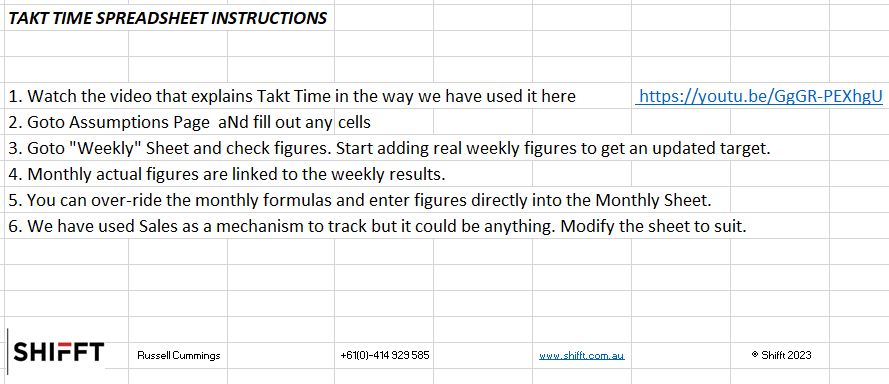
In the spreadsheet we’ve built for this purpose, we’ve laid out the 50 weeks with a weekly budget of $120,000, totaling $6 million. As we input our actual sales figures, the model automatically recalibrates our future targets to ensure we still hit our annual goal. It’s a remarkably straightforward yet powerful tool that keeps your business on track.
For instance, if you achieve $100,000 in the first month, the model indicates that you should aim for $120,408 in every subsequent month to reach your annual target. If your performance varies, the model adapts accordingly, making it easier to strategize and reallocate efforts.
The beauty of this approach is its flexibility. Whether you prefer a weekly or monthly tracking system, the principles remain the same. It allows your team to self-adjust their efforts, preventing constant sprinting and enabling you to fine-tune your focus based on real-world results.
But that’s not all. You can also download the spreadsheet we’ve used in this video from our website. It’s a free resource that you can tailor to your specific needs, whether you prefer hourly, daily, or other timeframes. Simply visit our website through the links provided in the video description.
At Shifft, we’re dedicated to helping you grow your business and reach new heights. Check out our website for a wealth of resources and tools to empower your business journey.
Thank you for tuning in, and we can’t wait to hear about your success with implementing Takt Time for your sales budgets. Cheers to your business’s continued growth and prosperity! Russ
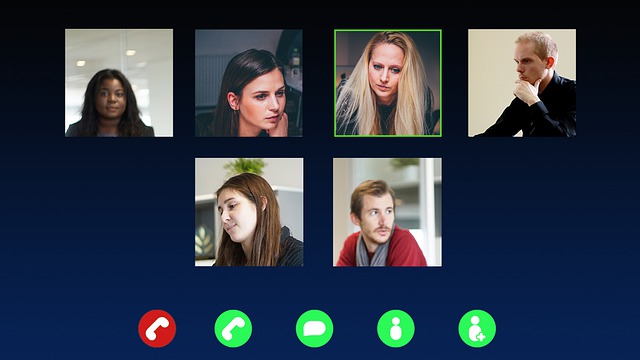
As we know, the makeup of teams has changed with COVID19. We’ve got more people working remotely—working from home or in other offices, working with split shifts with half the team working in other offices—to try and minimise the ongoing impact of COVID19. Basically, it means more disruption and less face-to-face communication.
Working remotely is a very different thing. Remote workers usually have lots of distraction, limited time constraints (“work when I want”), less formality, no dress code, and none of the normal rituals they’re used to going through at work (coffee, lunch, social stuff, meetings).
There’s a lot less connection with peers so communication is deliberate and not accidental. There are no water cooler conversations, coffee or tea breaks, lunches, and isolation can be very challenging for some.
Some remote workers also find they have limited IT systems and internet speeds, and this may affect their productivity i.e. where they’re used to having 2 or 3 screens at work, they’re now limited to 1 screen through VPN, and internet speeds could be significantly lower.
Another thing to think about is that “Present is not productive.” For them to sit in front of the computer 8 hours a day is not necessarily productive. I’ve put together some productivity hacks for remote workers that is worthwhile communicating with your staff to give them some ideas on how they can be a bit more productive. You can find them here – https://shifft.com.au/business-tips/working-at-home/
Remote team management for me is around 4 things:
1. Support by a strong foundation of good leadership
In these difficult times, you can never underestimate the need for strong leadership. So, what is your “Personal Brand” as a leader? If you haven’t taken the time to develop it, now is a great time to do so. As a leader, you’ll need to be clear on what it is you stand for and how you want to be perceived by your team. We have discussed your Personal Brand in previous blogs. Watch this short video for some insights – https://www.youtube.com/watch?v=rI3X5LwPs4A
It is also important to monitor the mental health of your team. Be in touch with them regularly and encourage them to seek assistance, if required, and maintain contact. It’s times like these when people can come really “undone”. There’s lots of negativity in the media that they’re exposed to now and that’s going to knock some of your team around.
2. Effective communication
In these times, there should be more communication, not less. Ramp up the level of communication in your organisation. Have regular meetings at consistent times to put some regularity and consistency back into people’s days.
What “meetings” should we have?
Daily “Zoom” huddles – for teams and/or organisations with a lot of people working remotely Daily Transactional Meetings with direct reports – to set clear expectations Weekly “Zoom” meetings for organisations Frequent Leadership meetings
Be available. This is not a good time to be occupied with other things. Make sure you’re available and there to support your team. Some businesses have a large proportion of their staff on reduced hours, and it will be challenging to keep them motivated and engaged with your organisation so that they are ready for when things turn around.
Make meetings fun. Try and make meetings a bit more engaging particularly when they’re a bit dry over their computer.
Make everyone feel part of the team. Think of what you can do to have some regular team events. Encourage virtual social events such as virtual morning teas, virtual lunches, etc. I ran a virtual drinks event over Easter, and though it wasn’t as fun as being together with everybody, at least we all got a chance to connect and talk.
3. Managing productivity
In an office environment, it’s easy to see and monitor what people are doing. But when they’re away, it’s much harder so have some systems in place.
Set clear expectations on “Performance”. There are two sets of expectations – global and individual. Global expectations are for everyone. What are your basic requirements? How would you like them to respond on things like: dress code, work times and effort, communication (response times, etiquette), confidentiality and productivity? On the other hand, individual expectations are set based on a person’s role (leadership, supervisory, etc.) Remember, DO NOT verbalise expectations – write them down!
Define productivity. What is productivity to you? What measures are you currently using? What measures should you be using? It’s often easier to define productivity via outcomes or tasks that you want teams or individuals to tick off that are linked to overall profitability and strategy. Build an Objectives and Key Results (“OKR”) framework for a more structured way of measuring productivity that cascades down from your strategies and plans.
Also, a video well worth watching on this topic is David Marquet’s Empowerment “Turn the Ship Around”. It’s a fantastic video about engaging with our people in terms of their output and their productivity, and the way we want them to get things done. Watch the video here – https://www.youtube.com/watch?v=OqmdLcyES_Q
Document roles and responsibilities. Too often, we don’t take the time to sit down and document what we expect of people in their role: what their responsibilities are, what levels of authority for decision-making will they have. There are great templates for this so make sure you take the time to document their roles and responsibilities particularly in productivity and performance.
Task Management. How will you allocate, communicate and manage tasks? This is where electronic systems like Trello can be invaluable. It is a system that I use for communication and for managing tasks. It allows full visibility, things don’t slip off the grid, you can have specific conversations with your team, and it stops a million emails from going back and forth.
I’ve put a video on how to use Trello on the website that you might find useful – https://shifft.com.au/videos/#oArrfgSv-gQ
Measure productivity. You can either have a manual-based or electronic-based process to collect data to measure productivity. Both processes are input-based but the electronic “harvested” data is probably the place to get to as it makes it easier for reporting. With measurements, it’s important to think about how you are going to report and who has access to that information. Universal access is not necessarily the right thing, although, individuals will need to see their data because measures are all about giving them something they can actually take control of and change.
Review performance. In my experience, it’s better to have a monthly circuit breaker discussion. It’s useful particularly in a time like this where teams are distributed, where you’re not going to have regular catch-ups. It’s good to have 10 or 15 minutes with each person once a month. For information on running Circuit Breaker sessions – https://shifft.com.au/circuit-breaker/
4. Having the right tools
Internet speeds. If you’re going to have people working from home or in different environments, it’s important that they have the fastest internet speeds available. Upgrade to faster NBN, upgrade download limits to “unlimited”, and consider subsidising for individuals particularly those on significantly reduced salaries and having to work from home.
Video conferencing. Make sure you’re using Zoom, Microsoft Team, or GoToMeeting for your distributed team meetings. Invest on better cameras and microphones particularly if you’re talking to clients, customers and suppliers. If you’re using Zoom, we’ve put some resources on the website that you might find useful – https://shifft.com.au/using-zoom/
Video messages rather than email. It’s easy to do and is far more productive. Video messages will take you 2 or 3 minutes to get you through what usually takes 10 or 15 minutes to type. Just remember that you need to plan your response so it’s not a ramble but rather a structured conversation. Record short videos and email them to your team and/or clients. Some tools you can use for this are: Snagit, Loom, Camtasia, Screenflow or simply use your smartphone and take a video.
More complex systems for larger teams. If you’ve got a larger team, you might want to think about more complex communication systems to get rid of email. You will want more of a chat-style product which Slack or Microsoft Teams allows you to do. I find Trello for small teams is just about all you need.
Now that you’ve got stuff sorted on managing your remote team, some next steps are:
Access the COVID19 Business Guide. There are heaps of business resources there that you can use to help manage your team and do things a lot better than you currently are – https://shifft.com.au/covid19-business-resources/
Sign up for our FREE Online Business Training. If you’re interested in getting some training for some of your staff/team members, colleagues/associates, we’re offering 2 free online training courses. There are 25 courses to pick from—they’re normally $200 each— but there’s a limit of 2 per person. We’re doing that as our way of helping people build their skills in these difficult times. Sign up here – https://shifft.com.au/free-online-business-training-programs/
Book a call with Russ. If I can help you at all, please give me a call. I’m happy to have a 30-minute to 60-minute call with you at no charge just to help you get through this difficult time. We’re all in it together so I’m more than happy for you to book a call with me through this link – https://calendly.com/russellcummings/30-minute-call or simply pick up the phone and give me call on my mobile 0414 929 585.
If you’ve got any questions, please don’t hesitate to pick up the phone or flick me an email. Hopefully we can get through this mess in the shortest period possible.